
Security teams have heard the promise of cloud computing for over a decade: spin up infrastructure in minutes, scale on demand, and only pay for what you use. Sounds great, right?
In reality, that same agility creates a visibility nightmare. Cloud instances appear and disappear hourly. Shadow IT provisions resources without approval. Multi-cloud strategies spread assets across AWS, Azure, and GCP with no unified view.
The data we’re seeing across Sevco deployments reveals a troubling pattern: organizations consistently undercount their cloud assets by 15-30%—and a significant portion of those “missing” assets have gaps in security tooling.
The Real Numbers Behind Cloud Asset Visibility
Let’s examine what a typical enterprise cloud environment looks like through Sevco’s Cloud Assets dashboard:
![Cloud Assets Dashboard Overview – Shows 388 total cloud assets across AWS EC2 (274), Azure Compute (10), and Google Cloud Platform (104)]
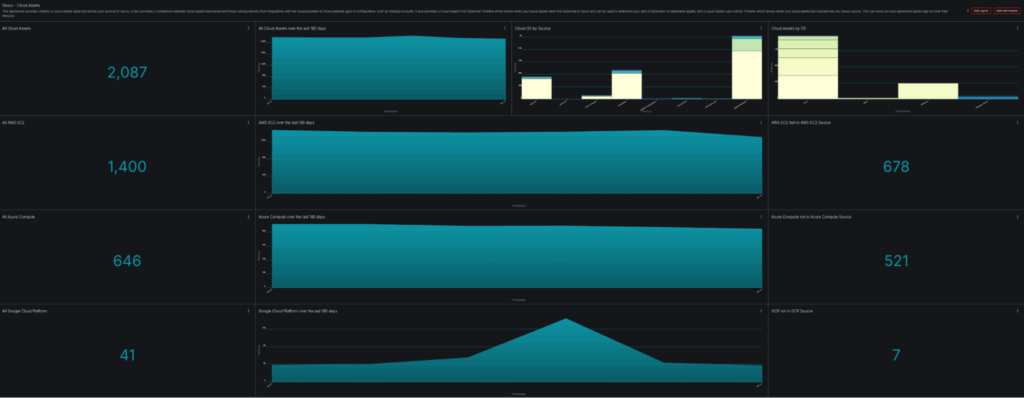
This dashboard shows an organization with 2,087 cloud assets across three major providers. But here’s where it gets interesting:
- 678 AWS EC2 instances are visible in sources other than the AWS EC2 integration but not in AWS EC2 from configured accounts.
- 521 Azure Compute instances are visible in sources other than the Azure Compute integration but not in Azure Compute from configured subscriptions.
- 7 GCP instances are visible in sources other than the GCP integration but not in the GCP integration from configured projects.
This means they’re showing up in EDR, vulnerability scanners, or CMDBs but not in the organization’s cloud provider sources that are configured in Sevco. This is often a sign that not all accounts/subscriptions/projects are known to the security team and can also mean that cloud security products, such as CSPMs, are missing cloud assets since they often don’t have these other inventory sources. These aren’t edge cases. This is the baseline state of cloud asset visibility for most enterprises.
Challenge #1: You Don’t Know What You Have
The fundamental challenge isn’t technical complexity—it’s that cloud assets exist in places your security tools can’t see.
Why Cloud Inventories Are Incomplete
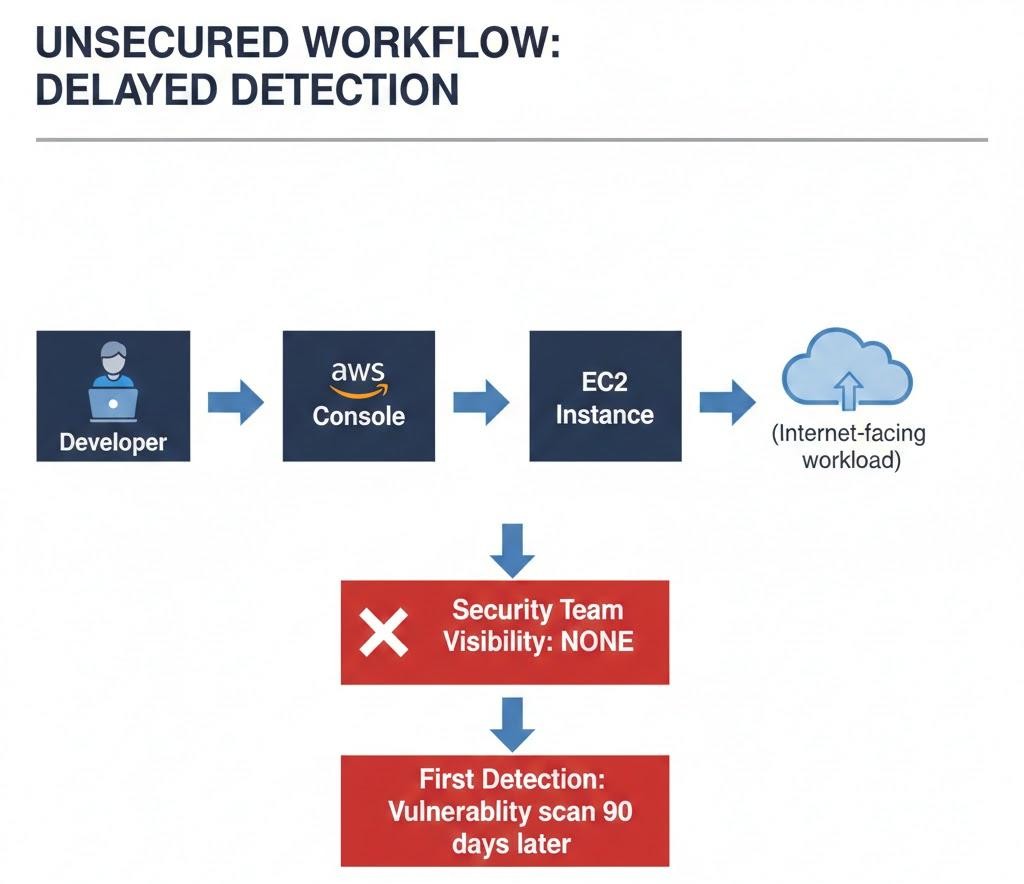
Cloud resources can be provisioned by anyone with credentials: developers spinning up test instances, data scientists launching ML workloads, or finance teams using BI tools with embedded compute. Each action creates assets that may never touch your security stack.
Consider the typical data flow:
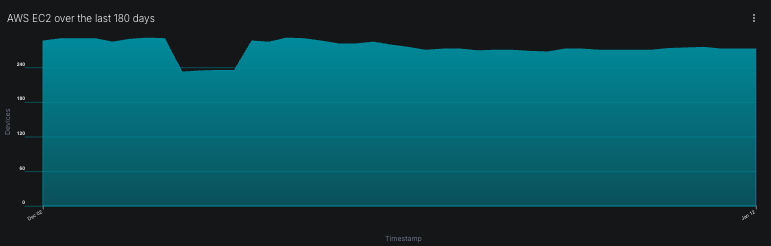
The AWS EC2 trend chart in our dashboard shows the real impact. Notice the increases. Each represents a =discovery where previously unknown instances were correlated into the inventory.
![AWS EC2 over the last 180 days – Shows changes in instance count over time]
Challenge #2: Ephemeral Assets Create Compliance Gaps
Cloud-native architectures increasingly rely on ephemeral infrastructure: containers, serverless functions, and auto-scaled instances that exist for minutes or hours. Traditional asset management assumes devices persist for months or years.
The Timeline Problem
Examine the “Cloud Assets First Observed Timeline” from our dashboard:
![Cloud Assets First Observed Timeline – Shows when new cloud assets were first detected in Sevco]
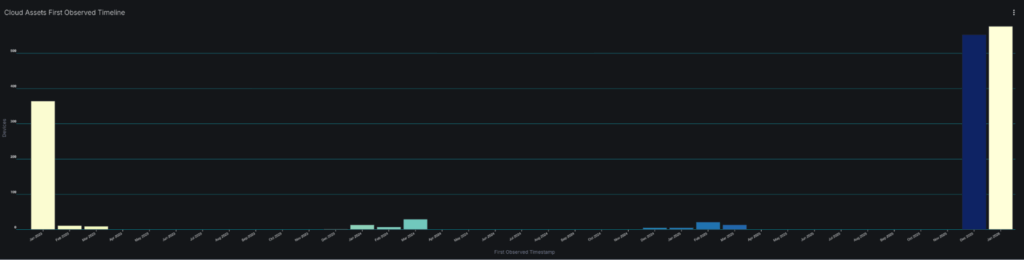
This histogram reveals discovery patterns over time. The spikes indicate batch onboardings: new cloud accounts connected, new integrations deployed, or discovery runs completed. But what about the gaps between spikes?
Those gaps could have contained ephemeral assets at one time that have been removed from the inventory. In some cases ephemeral instances are not retired properly and will remain in one or more source. Knowing when a system was first observed in Sevco can tell you a lot about your cloud lifecycle and whether your onboarding and offboarding of ephemeral systems is what you’d expect. Additional reports can be used to look at presence of controls for cloud assets in specific time windows.
Challenge #3: Multi-Cloud Sprawl Fragments Visibility
Organizations rarely choose a single cloud provider. M&A activity brings inherited infrastructure. Development teams have preferences. Vendor solutions deploy to specific clouds. The result is fragmented visibility across providers with no single source of truth.
Source-Level Analysis
The Sevco Unified Inventory breaks down where cloud devices are being reported:
![Sevco Unified Inventory – Venn diagram showing overlap and gaps between different sources reporting cloud assets]
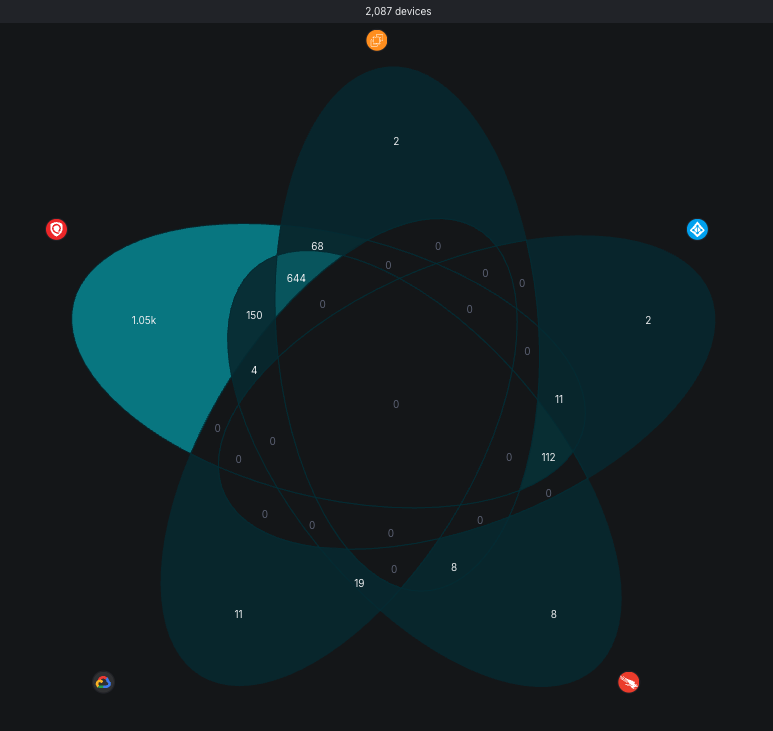
This visualization reveals which sources have visibility into which assets. When you see a source reporting assets that your cloud provider integration doesn’t see, you have one of two problems:
- Account gap: The asset exists in a cloud account you haven’t integrated or don’t have knowledge of
- Configuration issue: Your cloud integration is missing permissions or regions
Challenge #4: No Historical Context for Incident Response
When a security incident occurs, investigators need to answer: What was the state of this asset when it was compromised?
If your asset inventory is point-in-time, you can only answer what exists now—not what existed three weeks ago when the initial access occurred.
The First Observed vs. Last Activity Gap
Compare the two timelines in our dashboard:
- First Observed Timeline: When assets were discovered by Sevco
- Last Activity Timeline: When assets last reported to any source
![Side-by-side timeline comparison showing discovery patterns vs activity patterns]
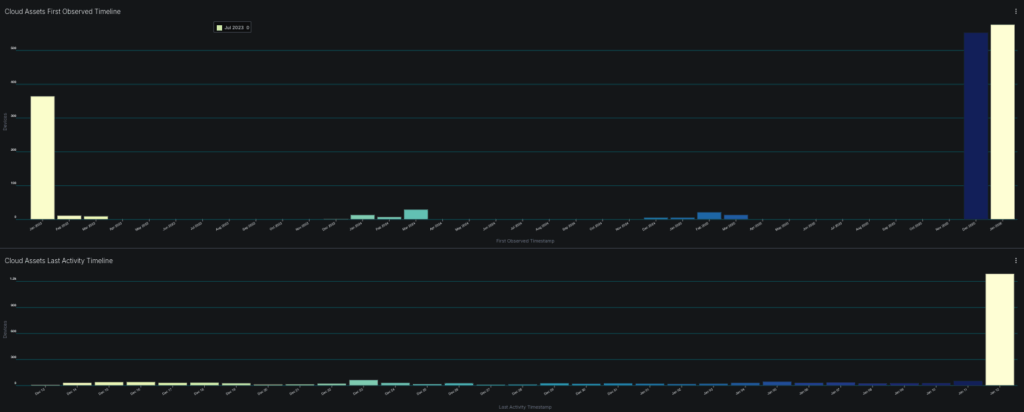
Assets with a First Observed date significantly after their actual creation indicate delayed detection. Assets with Last Activity dates in the distant past may be abandoned or isolated.
For incident response, you need:
- Point-in-time snapshots: What security controls were present on Date X?
- Change history: When did controls change? Who changed them?
- Correlation data: What other assets shared identifiers with this asset?
Cloud Asset Inventory Methodology
Building an accurate cloud inventory with full asset visibility requires taking a systematic approach:
Phase 1: Source Integration (Week 1-2)
Connect authoritative cloud sources first:
- AWS Organizations with cross-account IAM roles
- Azure Management Groups with Reader permissions
- GCP Organization with Security Reviewer role
- Enable all regions, not just “primary” regions
Phase 2: Cross-Source Correlation (Week 3-4)
Layer in security tool data:
- EDR agent inventory
- Vulnerability scanner results
- CMDB exports
- CSPM inventory
Phase 3: Gap Analysis (Week 5-6)
Identify discrepancies:
- Assets in cloud sources missing security controls
- Assets in security tools that have cloud identifiers (e.g. instance IDs) missing from cloud sources
- Assets with stale last-seen timestamps
Phase 4: Continuous Monitoring (Ongoing)
Implement alerting for:
- New assets without required controls after 24 hours
- Assets disappearing from cloud sources but persisting elsewhere
- Unexpected cloud assets and accounts appearing in data
Take Control of Your Cloud Asset Inventory
The organizations that successfully manage cloud security are those that can accurately answer fundamental questions:
- How many cloud assets do we have—and can we prove it?
- Which assets are missing security controls—and why?
- What changed in our environment over the last 30/60/90 days?
- Can we reconstruct asset state for any point in time?
If you can’t answer these questions with confidence, your cloud security posture has gaps you haven’t discovered—yet.
The Sevco Exposure Assessment Platform provides the correlation engine, historical retention, and gap analysis capabilities required to maintain accurate cloud asset inventories at enterprise scale.
Ready to see what’s actually in your cloud environment? The Sevco platform aggregates data from your cloud providers, security tools, and IT systems to deliver a unified, continuously updated asset inventory—with the visibility to identify coverage gaps before attackers exploit them.
Book a demo to see how Sevco can transform your cloud asset visibility.